OPCServer:Create Variables with Intouch FS Gateway using the Item Browser
Jump to navigation
Jump to search
Create Variables with Intouch FS Gateway using the Item Browser
To create Variables with Intouch FS Gateway using the Item Browser, please follow the description step by step.
- Start the ArchestrA System Management Console
- Start ⇒ Programme ⇒ Wonderware ⇒ System Management Console
- Add a OPC Node via <Add OPC Object> with the name IBH:

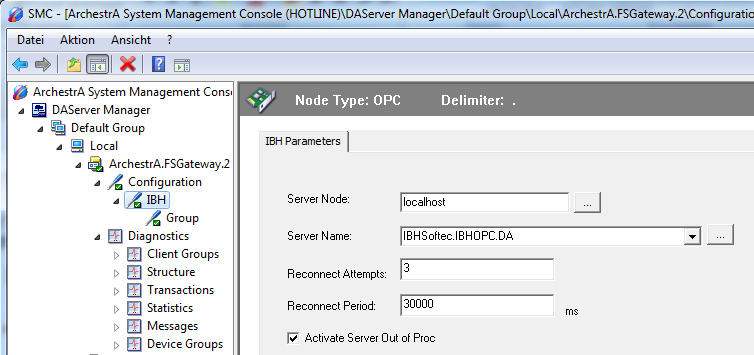
- As <Server Node> enter <localhost> or the IP Address of the PC, where the IBH OPC Server is running:
- As <Server Name> choose the IBH OPC Server:

- Add a OPC Group with the name Group:

- Within the filed <OPC Item ID Prefix> the name of the PLC can be entered, which was created within IBH OPC Editor f.e.PLC1_S5.Generic followed by a dot. This simplifies the <Item> creation later on.

- By clicking the button Browse OPC Items the wished items can be selcted.


- Start the Intouch WindowMaker and create a new Acess name f.e. IBH :
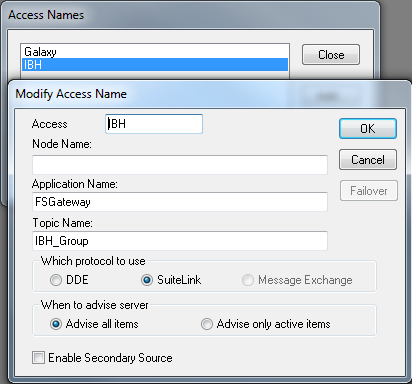
- Leave the field <Node name>empty or enter the IP Address of the PC , where the IBH OPC Server is running:
- As <Application name> enter FSGateway.
- The <Topic-Name> is the combination of Node name IBH and OPC Group name Group.

- Now the Tagnamess can be created:

- Select the newly created Access Name: IBH.
- AS <Item> the within the OPC Editor created variables can be entered.
- The configuration is now completed and the variables can be used:
