OPCServer:Create Variables with Intouch FS Gateway: Difference between revisions
Jump to navigation
Jump to search
Created page with "== Variablen mit Intouch FS Gateway erstellen ==Um die Variablen mit Intouch FS Gateway verwenden zu können, gehen Sie bitte Schritt für Schritt laut der vorliegenden Anweis..." |
No edit summary |
||
| (42 intermediate revisions by the same user not shown) | |||
| Line 1: | Line 1: | ||
== | == Create Variables with Intouch FS Gateway == | ||
To create Variables with Intouch FS Gateway with Intouch, please follow the description step by step. | |||
* Start the '''ArchestrA System Management Console''' | |||
:Start ⇒ Programme ⇒ Wonderware ⇒ System Management Console | |||
* Add a '''OPC Node''' via '''<Add OPC Object>''' with the name '''IBH''': | |||
:[[Image:FS gateway Add OPC Object.png|378px]] | |||
:[[Image:FS gateway OPC Objekt.png|807px]] | |||
:As '''<Server Node>''' enter the IP Address of the PC , where the IBH OPC Server is running:<br /> | |||
:As '''<Server Name>''' choose the IBH OPC Server:<br /> | |||
* Add a '''OPC Group''' with the name '''OPC_Server''': | |||
:[[Image:FS gateway OPC Group Object eng.png|847px]] | |||
:Within the filed '''<OPC Item ID Prefix>''' the name of the PLC can be entered, which was created within IBH OPC Editor f.e. '''PLC1''' followed by a dot. | |||
:[[Image:IBH OPC PLC properties.png|295px]] | |||
:So the notation '''<Access-path>''' within the later '''<Item>''' creation can be omitted.<br /> | |||
* Start the '''Intouch WindowMaker''' and create a new Acess name f.e. IBH_OPC : | |||
:[[Image:FS gateway Access name.png|408px]] | |||
:As '''<Node name>''' enter the IP Address of the PC , where the IBH OPC Server is running:<br /> | |||
:As '''<Application name>''' enter '''FSGateway'''.<br /> | |||
:The '''<Topic-Name>''' is the combination of '''Node''' name '''IBH''' and '''OPC Group''' name '''OPC_Server'''. | |||
* Now the Tagnamess can be created: | |||
:[[Image:FS gateway Tagname.png|600px]] | |||
:Select the newly created '''Access Name''': IBH_OPC. | |||
:The entry '''<Item>''' consists of: | |||
:'''<Access-Path>.<Item Name>'''. | |||
:The '''<Access-Path>''' represents the name of the <PLC>, which has been created in the IBH OPC Editor. | |||
:The '''<Access-Path>''' is not necessary in our sample, because it is aready defined within '''<OPC Item ID Prefix>''' . | |||
:To access the variables which are already defined within the IBH OPC Editor the correct syntax is: | |||
:'''Generic.<Variable Name>''' | |||
* The configuration is now completed and the variables can be used: | |||
:[[Image:FS gateway Light Wizard.png|554px]] | |||
Latest revision as of 08:12, 30 October 2012
Create Variables with Intouch FS Gateway
To create Variables with Intouch FS Gateway with Intouch, please follow the description step by step.
- Start the ArchestrA System Management Console
- Start ⇒ Programme ⇒ Wonderware ⇒ System Management Console
- Add a OPC Node via <Add OPC Object> with the name IBH:

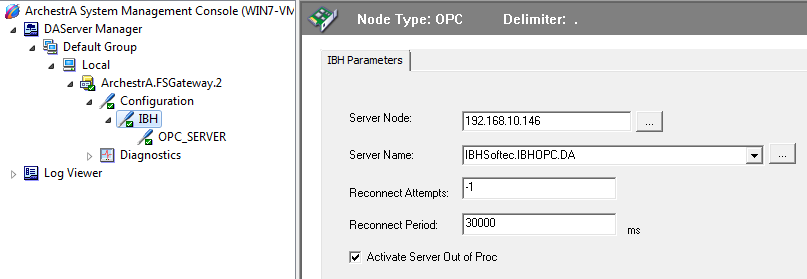
- As <Server Node> enter the IP Address of the PC , where the IBH OPC Server is running:
- As <Server Name> choose the IBH OPC Server:

- Add a OPC Group with the name OPC_Server:
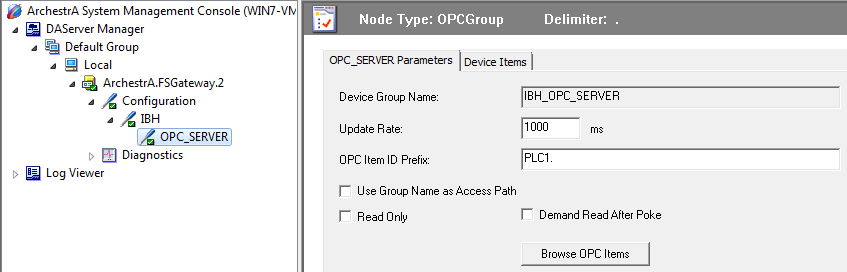
- Within the filed <OPC Item ID Prefix> the name of the PLC can be entered, which was created within IBH OPC Editor f.e. PLC1 followed by a dot.
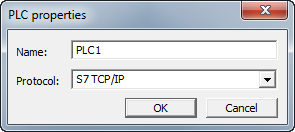
- So the notation <Access-path> within the later <Item> creation can be omitted.


- Start the Intouch WindowMaker and create a new Acess name f.e. IBH_OPC :
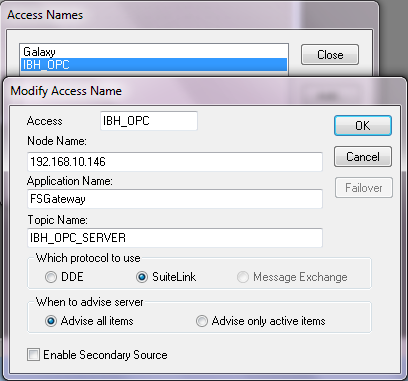
- As <Node name> enter the IP Address of the PC , where the IBH OPC Server is running:
- As <Application name> enter FSGateway.
- The <Topic-Name> is the combination of Node name IBH and OPC Group name OPC_Server.

- Now the Tagnamess can be created:
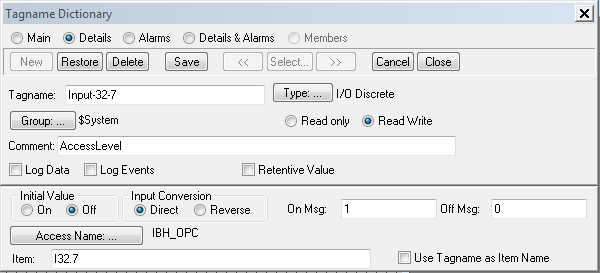
- Select the newly created Access Name: IBH_OPC.
- The entry <Item> consists of:
- <Access-Path>.<Item Name>.
- The <Access-Path> represents the name of the <PLC>, which has been created in the IBH OPC Editor.
- The <Access-Path> is not necessary in our sample, because it is aready defined within <OPC Item ID Prefix> .

- To access the variables which are already defined within the IBH OPC Editor the correct syntax is:
- Generic.<Variable Name>
- The configuration is now completed and the variables can be used:
